Your HTML
Paste or type HTML here, open a file, or pick one of the examples above. With Live on, the preview updates as you type.
Paste HTML, open a file or load a live page's source. This HTML code viewer renders it as you type, and the console and markup problems show underneath.
Nothing logged yet. console.log() output, errors and failed images or stylesheets from the page appear here.
Shortcuts (⌘ on a Mac): Ctrl+Enter runs, Ctrl+F searches, Ctrl+S downloads, Esc then Tab leaves the editor
While Live is on, the HTML code viewer redraws as you type. On a phone, use the Paste button above the editor. Above about 400 KB, live preview pauses so typing stays quick; press Run or Ctrl+Enter.
Open file, or drag an .html file onto the HTML code viewer. Code you paste or open in the HTML code viewer stays in your browser; files can be up to 10 MB. A file in another encoding, such as GBK, Shift_JIS or Windows-1252, opens correctly in the HTML code viewer; without a charset tag it guesses and tells you which one it used.
example.com | Source of example.com, status 200 |
| A page that blocks bots | Its 403 or 429 page, with that status in the title |
localhost, 192.168.x.x | Refused: private addresses |
Fetched once, without running scripts, so the HTML code viewer shows the raw HTML the server sent. 5 MB and 12 seconds at most.
Each one replaces what is in the HTML code viewer editor.
Fit follows the width of the HTML code viewer panel. Phone is 390 px, Tablet 768 px and Laptop 1280 px; anything wider than the panel is scaled to fit. Media queries in your code fire at the chosen width, not your window’s.
| Your page does | The Console shows |
|---|---|
console.log('hi', {n: 1}) | hi {n: 1} |
alert('Saved') | alert(): Saved |
confirm('Delete it?') | confirm(): Delete it? → returned true |
<form action="/signup" method="post"> submitted | Form not sent from the preview: POST /signup with name=Sam |
undefinedThing() | Uncaught ReferenceError: undefinedThing is not defined (line 10) |
while (true) {} | A loop ran for more than a second, so the preview stopped it. Check its exit condition (line 12) |
<img src="missing.png"> | Failed to load <img> missing.png |
alert() never opens a dialog in the HTML code viewer, so a page that alerts in a loop can’t lock you out. Forms don’t submit; you see what they would have sent.
The HTML code viewer flags unclosed and misnested tags, stray closing tags, a quote or comment left open, a link inside a link, duplicate ids, images without alt, a block inside a <p>, stylesheets and scripts with relative paths, and Markdown fences or chat text pasted above the doctype. In the tool, clicking a row jumps to its line. Optional closing tags such as </li> are not flagged.
From the example, 4 of its 6 rows
The HTML code viewer lists the size, lines, tag counts, the page title, links, images and scripts, and whether the browser drew the page in standards or quirks mode.
Turn it on, then click anything in the preview: the HTML code viewer selects the tag that drew it, with its line and column.
Neither changes how your page renders in the HTML code viewer or anywhere else. Text in elements your CSS sets to white-space: pre stays exactly as written.
<ul><li><a href="/">Home</a></li><li><b>New</b> items</li></ul>
<ul>
  <li><a href="/">Home</a></li>
  <li><b>New</b> items</li>
</ul>
The HTML code viewer formats with Prettier, CSS and JavaScript blocks included. a<b>b</b>c stays joined and <pre> keeps its spacing. 2 spaces, 4 spaces or tabs.
| Removes | Keeps |
|---|---|
| Ordinary comments | Outlook conditional comments, closing ones too |
| Extra spaces and line breaks | pre, textarea, script and style as written |
| Whitespace next to blocks | The space between two inline elements |
The HTML code viewer doesn’t rename anything or touch what is inside script and style tags.
After either one, the HTML code viewer shows an Undo button for a few seconds. Ctrl+Z works too, and takes back the whole change in one step.
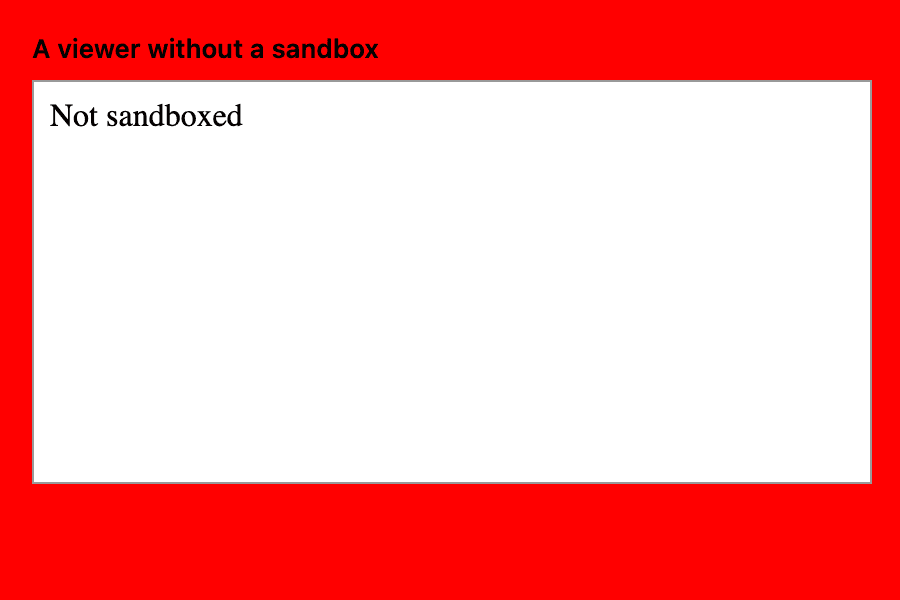
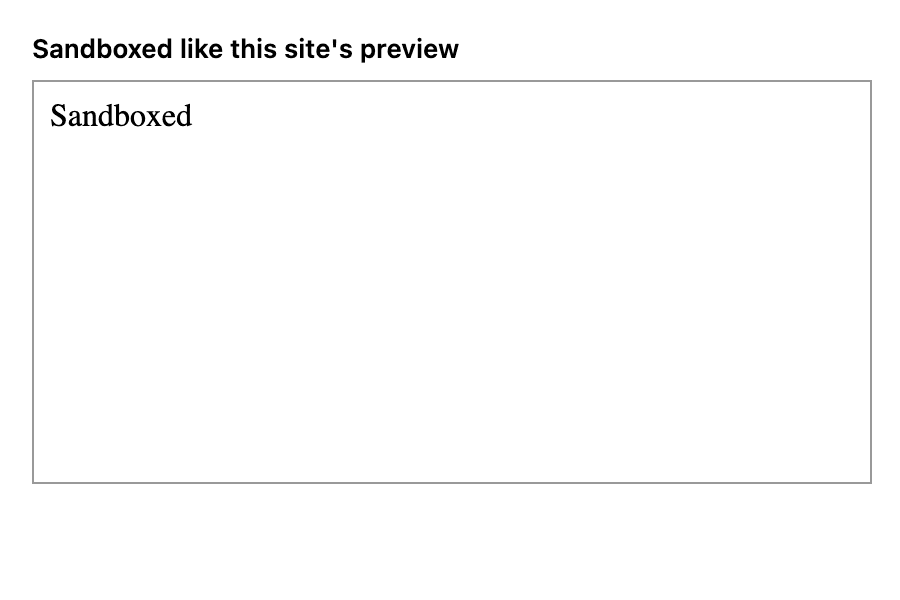
Previews in the HTML code viewer run in a sandboxed frame. Scripts work, but they can’t read this page, its storage or your other tabs. That matters when you open a file a stranger sent you. You can check any HTML code viewer, this one included, by pasting this:
<script>
  try {
    var page = parent.document.body;
    page.style.background = 'red';
    document.write('Not sandboxed');
  } catch (e) {
    document.write('Sandboxed');
  }
</script>Not every HTML code viewer passes.
Code you paste into the HTML code viewer is not sent to me. Share links carry it after the #, a part of the address browsers never send to a server. The privacy policy lists what is stored.
Choose Phone after pasting a template into the HTML code viewer. Open the HTML code viewer in Safari and the preview is close to Apple Mail, since both use WebKit. Gmail strips some CSS and Outlook for Windows draws email with Word, so check those two separately.
Codes for sites like Toyhouse are often written with Bootstrap classes. Put the Bootstrap stylesheet link at the top and the HTML code viewer preview gets much closer to the real profile.
Paste what ChatGPT or Claude gave you into the HTML code viewer to see whether it really renders. Problems catches the tags it forgot to close; the Console catches scripts that throw.
The HTML code viewer handles one page at a time. Use View Source (Ctrl+U) for the page you’re on, though it’s read-only and hard to reach on phones. Use DevTools (F12) to see the page after its scripts run, and VS Code with Live Preview for a project with many files.